Author Archives: admin

Update Service with new SSL certificate

Some service SSL certificate is adminstrate though netsh

start netsh, though a CMD, with just type: netsh

If you then type: http show sslcert, you can see SSL certificate information:

netsh>http show sslcert
SSL Certificate bindings:
-------------------------
IP:port                      : 0.0.0.0:443
Certificate Hash             : 5f5bd1c99549b2fd7d772d32a60b8a2ba38bedd5
Application ID               : {4dc3e181-e14b-4a21-b022-59fc669b0914}
Certificate Store Name       : (null)
Verify Client Certificate Revocation : Enabled
Verify Revocation Using Cached Client Certificate Only : Disabled
Usage Check                  : Enabled
Revocation Freshness Time    : 0
URL Retrieval Timeout        : 0
Ctl Identifier               : (null)
Ctl Store Name               : (null)
DS Mapper Usage              : Disabled
Negotiate Client Certificate : Disabled

So to update this ssl certificate you type:

netsh>http add sslcert ipport=0.0.0.0:443 certhash=5f5bd1c99549b2fd7d772d32a60b8a2ba38bedd5 appid={4dc3e181-e14b-4a21-b022-59fc669b0914}

Where 5f5bd1c99549b2fd7d772d32a60b8a2ba38bedd5 is the thumbprint of the SSL certificate. The thumbprint of a certificate can be found by running this powershell commands:

Get-ChildItem -path cert:\LocalMachine\My

Lenovo Update ONECLI

OneCli.exe update acquire –scope latest –mt 7X06 –os win2016 –dir C:\Lenovo\Driver

Onecli.exe update flash –dir C:\Lenovo\Driver –scope latest

You find ONECLI on Lenovo Support page, under the specific server

Please change -mt to the machine type you are downloading for.

Restart Explorer as Adminstrator

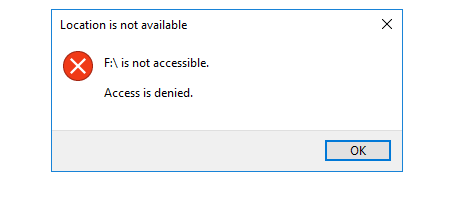
If you have problems with accessing a drive, with the error message: f:\ is not accessible. Access is denied

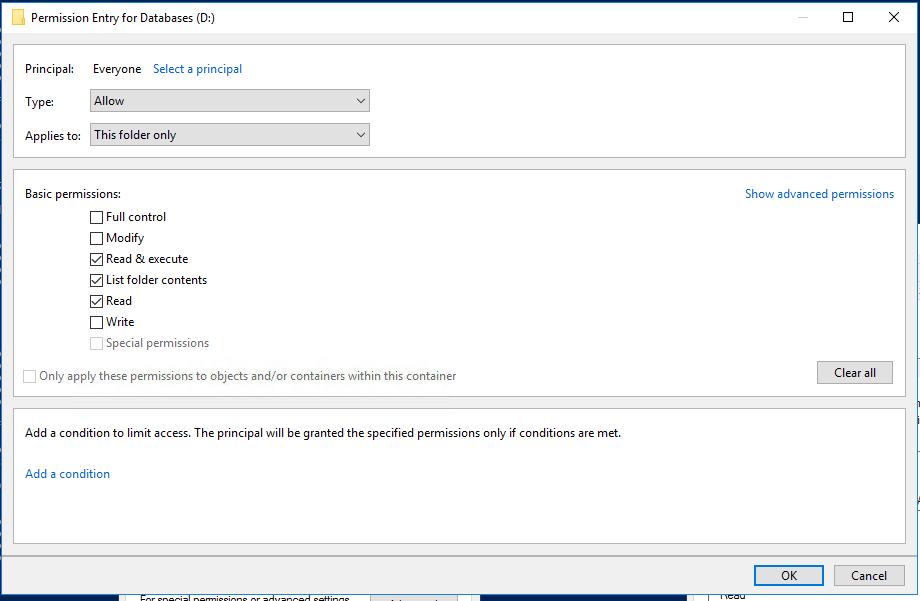
It can happen, if the drive doesn’t have this permission:
Everyone (This folder Only):

  • Read & Execute
  • List folder contents
  • Read

To access the drive, you need restart Explorer as administrator.

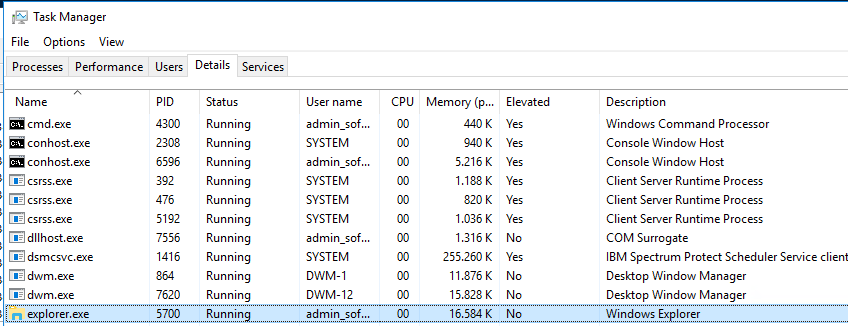
Find Explorer.exe as the user you are login as. In this example the username is admin_sofi, and kill it by right click on it and choice “End Task”

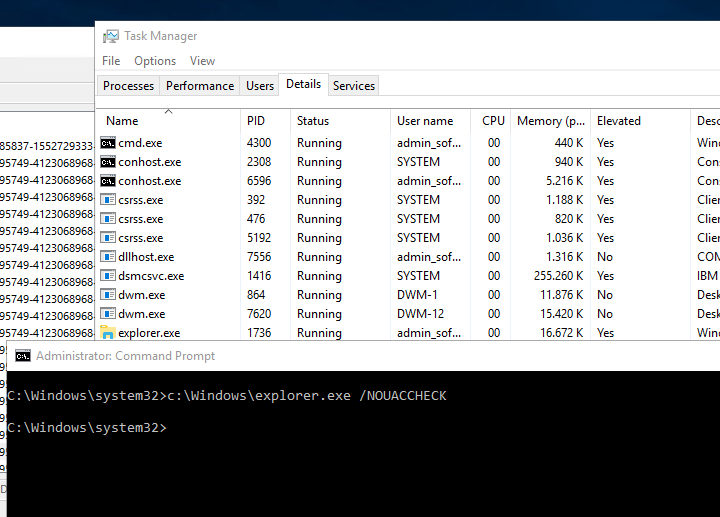
After start CMD as administrator, and write this command:
c:\windows\explorer.exe /NOACCHECK

After this you can see that explorer.exe is now running in “Elevated”

MSSQL database roles get all securables – Full script out the Database Roles

/********************************************************************
 *                                                                  *
 * Author: John Eisbrener                                           *
 * Script Purpose: Script out Database Role Definition              *
 * Notes: Please report any bugs to http://www.dbaeyes.com/         *
 *                                                                  *
 * Update: 2014-03-03 - Adjusted output to accommodate Role         *
 *                      definitions that are longer than 8000 chars *
 * Update: 2013-09-03 - Added user output per Joe Spivey's comment  *
 *                    - Modified formatting for oddly named objects *
 *                    - Included support for Grants on DMVs         *
 ********************************************************************/
DECLARE @roleName VARCHAR(255)
SET @roleName = 'DatabaseRoleName'

-- Script out the Role
DECLARE @roleDesc VARCHAR(MAX), @crlf VARCHAR(2)
SET @crlf = CHAR(13) + CHAR(10)
SET @roleDesc = 'CREATE ROLE [' + @roleName + ']' + @crlf + 'GO' + @crlf + @crlf

SELECT    @roleDesc = @roleDesc +
        CASE dp.state
            WHEN 'D' THEN 'DENY '
            WHEN 'G' THEN 'GRANT '
            WHEN 'R' THEN 'REVOKE '
            WHEN 'W' THEN 'GRANT '
        END + 
        dp.permission_name + ' ' +
        CASE dp.class
            WHEN 0 THEN ''
            WHEN 1 THEN --table or column subset on the table
                CASE WHEN dp.major_id < 0 THEN
                    + 'ON [sys].[' + OBJECT_NAME(dp.major_id) + '] '
                ELSE
                    + 'ON [' +
                    (SELECT SCHEMA_NAME(schema_id) + '].[' + name FROM sys.objects WHERE object_id = dp.major_id)
                        + -- optionally concatenate column names
                    CASE WHEN MAX(dp.minor_id) > 0 
                         THEN '] ([' + REPLACE(
                                        (SELECT name + '], [' 
                                         FROM sys.columns 
                                         WHERE object_id = dp.major_id 
                                            AND column_id IN (SELECT minor_id 
                                                              FROM sys.database_permissions 
                                                              WHERE major_id = dp.major_id
                                                                AND USER_NAME(grantee_principal_id) IN (@roleName)
                                                             )
                                         FOR XML PATH('')
                                        ) --replace final square bracket pair
                                    + '])', ', []', '')
                         ELSE ']'
                    END + ' '
                END
            WHEN 3 THEN 'ON SCHEMA::[' + SCHEMA_NAME(dp.major_id) + '] '
            WHEN 4 THEN 'ON ' + (SELECT RIGHT(type_desc, 4) + '::[' + name FROM sys.database_principals WHERE principal_id = dp.major_id) + '] '
            WHEN 5 THEN 'ON ASSEMBLY::[' + (SELECT name FROM sys.assemblies WHERE assembly_id = dp.major_id) + '] '
            WHEN 6 THEN 'ON TYPE::[' + (SELECT name FROM sys.types WHERE user_type_id = dp.major_id) + '] '
            WHEN 10 THEN 'ON XML SCHEMA COLLECTION::[' + (SELECT SCHEMA_NAME(schema_id) + '.' + name FROM sys.xml_schema_collections WHERE xml_collection_id = dp.major_id) + '] '
            WHEN 15 THEN 'ON MESSAGE TYPE::[' + (SELECT name FROM sys.service_message_types WHERE message_type_id = dp.major_id) + '] '
            WHEN 16 THEN 'ON CONTRACT::[' + (SELECT name FROM sys.service_contracts WHERE service_contract_id = dp.major_id) + '] '
            WHEN 17 THEN 'ON SERVICE::[' + (SELECT name FROM sys.services WHERE service_id = dp.major_id) + '] '
            WHEN 18 THEN 'ON REMOTE SERVICE BINDING::[' + (SELECT name FROM sys.remote_service_bindings WHERE remote_service_binding_id = dp.major_id) + '] '
            WHEN 19 THEN 'ON ROUTE::[' + (SELECT name FROM sys.routes WHERE route_id = dp.major_id) + '] '
            WHEN 23 THEN 'ON FULLTEXT CATALOG::[' + (SELECT name FROM sys.fulltext_catalogs WHERE fulltext_catalog_id = dp.major_id) + '] '
            WHEN 24 THEN 'ON SYMMETRIC KEY::[' + (SELECT name FROM sys.symmetric_keys WHERE symmetric_key_id = dp.major_id) + '] '
            WHEN 25 THEN 'ON CERTIFICATE::[' + (SELECT name FROM sys.certificates WHERE certificate_id = dp.major_id) + '] '
            WHEN 26 THEN 'ON ASYMMETRIC KEY::[' + (SELECT name FROM sys.asymmetric_keys WHERE asymmetric_key_id = dp.major_id) + '] '
         END COLLATE SQL_Latin1_General_CP1_CI_AS
         + 'TO [' + @roleName + ']' + 
         CASE dp.state WHEN 'W' THEN ' WITH GRANT OPTION' ELSE '' END + @crlf
FROM    sys.database_permissions dp
WHERE    USER_NAME(dp.grantee_principal_id) IN (@roleName)
GROUP BY dp.state, dp.major_id, dp.permission_name, dp.class

SELECT @roleDesc = @roleDesc + 'GO' + @crlf + @crlf

-- Display users within Role.  Code stubbed by Joe Spivey
SELECT	@roleDesc = @roleDesc + 'EXECUTE sp_AddRoleMember ''' + roles.name + ''', ''' + users.name + '''' + @crlf
FROM	sys.database_principals users
		INNER JOIN sys.database_role_members link 
			ON link.member_principal_id = users.principal_id
		INNER JOIN sys.database_principals roles 
			ON roles.principal_id = link.role_principal_id
WHERE	roles.name = @roleName

-- PRINT out in blocks of up to 8000 based on last \r\n
DECLARE @printCur INT
SET @printCur = 8000

WHILE LEN(@roleDesc) > 8000
BEGIN
    -- Reverse first 8000 characters and look for first lf cr (reversed crlf) as delimiter
    SET @printCur = 8000 - CHARINDEX(CHAR(10) + CHAR(13), REVERSE(SUBSTRING(@roleDesc, 0, 8000)))

    PRINT LEFT(@roleDesc, @printCur)
    SELECT @roleDesc = RIGHT(@roleDesc, LEN(@roleDesc) - @printCur)
END

PRINT @roleDesc + 'GO'

Thanks for the script to John Eisbrener – Check for new version here: https://dbaeyes.wordpress.com/2013/04/19/fully-script-out-a-mssql-database-role/

Windows 7/2008/2008 R2 Won’t boot after installation of KB4512506 / KB4512486 / KB4512476

After installation of these update, you can have problem booting you server. with this warning:

The digital signature for this file couldn’t be verified.
file:\windows\system32\winload.efi status 0xc0000428

You can fix it by booting you windows operation on the installation disc, and go to a Recovery command prompt and type these commands:

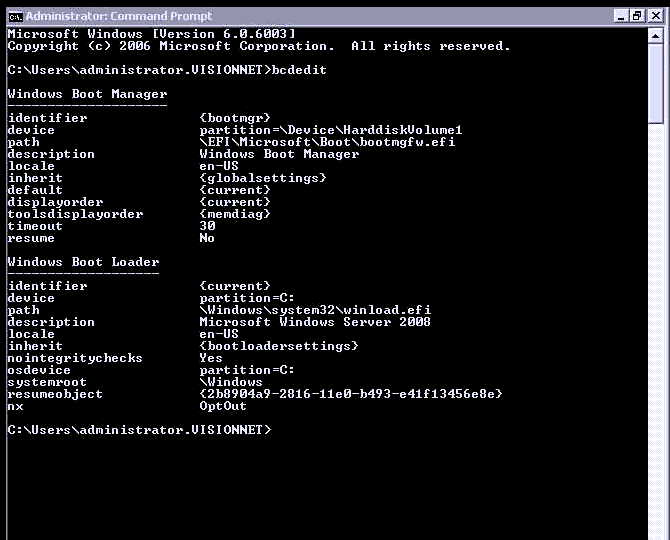
c:\> bcdedit

This screenshot is taken from a running Windows Server, in a recovery boot the identifier under the second Windows Boot Loader, will be named {default} instead of {current}

c:\> bcdedit -set {default} -nointegritychecks 1

Replace {default} with the one from the bcdedit output.

Normal this have been resolved by installation and updated version of KB4474419, but there have not been an updated version to Windows server 2008 yet.
But to Windows 7 and Windows server 2008 R2, you can download an updated version here:
http://www.catalog.update.microsoft.com/search.aspx?q=kb4474419


Change autodiscover URL (EWS URL / OAB URL / ECP URL / Activesync URL) – Exchange 2016 / Exchange 2019

If you want to change Mapi, Autodiscover / EWS / OAB / OWA / ECP / Activesync Url, this is how it works

Example you have bought a certificate on you external name, and now you got certificate warnings in outlook.

set-MapiVirtualDirectory -id "SERVERNAME\mapi (Default Web Site)" -internalurl https://owa.domain.prefix/mapi -externalurl https://owa.domain.prefix/mapi

Set-WebServicesVirtualDirectory -Identity "SERVERNAME\EWS (Default Web Site)" -InternalUrl https://owa.domain.prefix/EWS/Exchange.asmx -externalurl https://owa.domain.prefix /EWS/Exchange.asmx -BasicAuthentication:$true

Set-AutoDiscoverVirtualDirectory -Identity "SERVERNAME\Autodiscover (Default Web Site)" -internalurl https://owa.domain.prefix/autodiscover/autodiscover.xml -externalurl https://owa.domain.prefix/autodiscover/autodiscover.xml 

set-OabVirtualDirectory -identity "SERVERNAME\OAB (Default Web Site)" -internalurl https://owa.domain.prefix/OAB -externalurl https://owa.domain.prefix/OAB 

set-EcpVirtualDirectory -identity "SERVERNAME\ecp (Default Web Site)" -internalurl https://owa.domain.prefix/ecp -externalurl https://owa.domain.prefix/ecp

set-OwaVirtualDirectory -identity "SERVERNAME\owa (Default Web Site)" -internalurl https://owa.domain.prefix/owa -externalurl https://owa.domain.prefix/owa 

set-ActiveSyncVirtualDirectory  -identity "SERVERNAME\Microsoft-Server-ActiveSync (Default Web Site)" -internalurl https://owa.domain.prefix/Microsoft-Server-ActiveSync -externalurl https://owa.domain.prefix/Microsoft-Server-ActiveSync

Set-ClientAccessServer -Identity "SERVERNAME" –AutoDiscoverServiceInternalUri https://owa.domain.prefix/autodiscover/autodiscover.xml  

iisreset

 Or if this is a single server installation you can do it like this: (Or if you want all servers to use the same URL

get-mapivirtualdirectory | set-MapiVirtualDirectory -internalurl https://owa.domain.prefix/mapi -externalurl https://owa.domain.prefix/mapi

get-WebServicesVirtualDirectory | Set-WebServicesVirtualDirectory -InternalUrl https://owa.domain.prefix/EWS/Exchange.asmx -externalurl https://owa.domain.prefix/EWS/Exchange.asmx -BasicAuthentication:$true 

get-AutoDiscoverVirtualDirectory | Set-AutoDiscoverVirtualDirectory -internalurl https://owa.domain.prefix/autodiscover/autodiscover.xml -externalurl https://owa.domain.prefix/autodiscover/autodiscover.xml 

get-OabVirtualDirectory | set-OabVirtualDirectory -internalurl https://owa.domain.prefix/OAB -externalurl https://owa.domain.prefix/OAB

get-EcpVirtualDirectory | set-EcpVirtualDirectory -internalurl https://owa.domain.prefix/ecp -externalurl https://owa.domain.prefix/ecp 

get-OwaVirtualDirectory | set-OwaVirtualDirectory -internalurl https://owa.domain.prefix/owa -externalurl https://owa.domain.prefix/owa

get-ActiveSyncVirtualDirectory | set-ActiveSyncVirtualDirectory  -internalurl https://owa.domain.prefix/Microsoft-Server-ActiveSync -externalurl https://owa.domain.prefix/Microsoft-Server-ActiveSync

get-ClientAccessServer | Set-ClientAccessServer  –AutoDiscoverServiceInternalUri https://owa.domain.prefix/autodiscover/autodiscover.xml

iisreset

MSSQL – check that the Agent Job have been run as Schedule

I have this problems, that if a schedule inside a Agent job, have not been started for some reason, there will be no errors about this problem.

So Í have created this script, that will give the Status of 1, if the job, haven’t been run for the last two hours.
I used PRTG to check the status.

USE msdb
GO

DECLARE @JobName VARCHAR(1000)
DECLARE @LastRunTime VARCHAR(1000)
DECLARE @LastRunStatus VARCHAR(1000)
DECLARE @CurrentTime VARCHAR(20)

SET @JobName = 'JOBNAME'

SET @CurrentTime = LEFT(REPLACE(CONVERT (time, DATEADD(HOUR, - 2, GETDATE())),':',''),6)

SELECT DISTINCT @LastRunTime = SJH.run_time
FROM sysjobhistory SJH, sysjobs SJ
WHERE SJ.[name] = @JobName AND SJH.job_id = SJ.job_id and SJH.run_date = 
(SELECT MAX(SJH1.run_date) FROM sysjobhistory SJH1 WHERE SJH.job_id = SJH1.job_id)

IF @LastRunTime >= @CurrentTime
	SELECT '0' AS Status
 ELSE
	SELECT '1' AS Status

In line 10, replace – 2 with the number of hours, you want to go back

Below is the same script, just for daily jobs, so it will will check if the job haven’t been run in the last 25 hours (My Schedule is set to run every 24 hours, and i give it an hour to be finish, before i got an alarm.

DECLARE @JobName VARCHAR(1000)
DECLARE @LastRunDate VARCHAR(1000)
DECLARE @LastRunStatus VARCHAR(1000)
DECLARE @CurrentDate VARCHAR(20) -- used for file name

SET @JobName = 'JOBNAME'

SET @CurrentDate = REPLACE(CONVERT (date, DATEADD(HOUR, -25, GETDATE())),'-','') 

SELECT DISTINCT @LastRunDate = SJH.run_date
FROM sysjobhistory SJH, sysjobs SJ
WHERE SJ.[name] = 'Fibia optimering daglig (Batch 2)' AND SJH.job_id = SJ.job_id and SJH.run_date = 
(SELECT MAX(SJH1.run_date) FROM sysjobhistory SJH1 WHERE SJH.job_id = SJH1.job_id)
ORDER BY SJH.run_date desc

IF @LastRunDate >= @CurrentDate
	SELECT '0' as Status
 ELSE
 	SELECT '1' as Status

In line 10, replace – 25 with the number of hours, you want to go back
Implement SQL Server Agent Jobs with AlwaysOn Availability Groups

The function I use fn_hadr_group_is_primary from this post is a UDF (User Defined Function) that we create in the master database. The function gets an Availability Group name as an input parameter and returns a Boolean value indicating weather this instance is a primary replica.

-- fn_hadr_group_is_primary
USE master;
GO
IF OBJECT_ID('dbo.fn_hadr_group_is_primary', 'FN') IS NOT NULL
  DROP FUNCTION dbo.fn_hadr_group_is_primary;
GO
CREATE FUNCTION dbo.fn_hadr_group_is_primary (@AGName sysname)
RETURNS bit
AS
BEGIN;
  DECLARE @PrimaryReplica sysname; 

  SELECT
    @PrimaryReplica = hags.primary_replica
  FROM sys.dm_hadr_availability_group_states hags
  INNER JOIN sys.availability_groups ag ON ag.group_id = hags.group_id
  WHERE ag.name = @AGName;

  IF UPPER(@PrimaryReplica) =  UPPER(@@SERVERNAME)
    RETURN 1; -- primary

    RETURN 0; -- not primary
END; 

Use the fn_hadr_group_is_primary function within a new job step to find if this sql instance is a Primary replica. If this is not a primary replica we issue a stop job request while identifying the current job name using SQL Server Agent Tokens

-- Detect if this instance's role is a Primary Replica.
-- If this instance's role is NOT a Primary Replica stop the job so that it does not go on to the next job step
DECLARE @rc int; 
EXEC @rc = master.dbo.fn_hadr_group_is_primary N'my-ag';

IF @rc = 0
BEGIN;
    DECLARE @name sysname;
    SELECT  @name = (SELECT name FROM msdb.dbo.sysjobs WHERE job_id = CONVERT(uniqueidentifier, '$(ESCAPE_NONE(JOBID))'));
    
    EXEC msdb.dbo.sp_stop_job @job_name = @name;
    PRINT 'Stopped the job since this is not a Primary Replica';
END;

Add Exchange management Shell to “normal powershell

Here are a script, that you can include in yours script, to add Exchange management shell, to “normal” powershell scripts.

$StopWatch = [System.Diagnostics.StopWatch]::StartNew()
Function Test-Command ($Command)
{
    Try
    {
        Get-command $command -ErrorAction Stop
        Return $True
    }
    Catch [System.SystemException]
    {
        Return $False
    }
}

IF (Test-Command "Get-Mailbox") {Write-Host "Exchange cmdlets already present"}
Else {

    $CallEMS = ". '$env:ExchangeInstallPath\bin\RemoteExchange.ps1'; Connect-ExchangeServer -auto -ClientApplication:ManagementShell "

    Invoke-Expression $CallEMS
$stopwatch.Stop()
$msg = "`n`nThe script took $([math]::round($($StopWatch.Elapsed.TotalSeconds),2)) seconds to execute..."
Write-Host $msg
$msg = $null
$StopWatch = $null
}